¶ Cost Centers
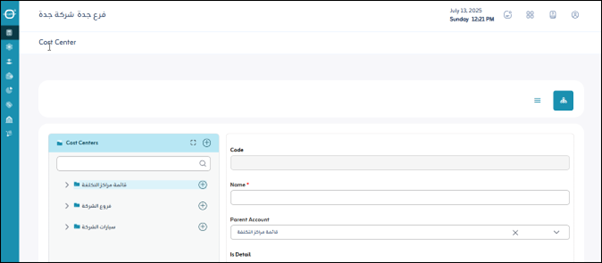
Usage: The "Cost Centers” screen is used to create and manage various cost centers in your accounting system. These centers allow you to track and analyze revenue and expenses across specific departments, projects, or activities within your company.
¶ Roles and Permissions
- An Administrator or users with View Cost Center permissions can access the Cost Center Management screen.
- An Administrator or users with Delete permissions can delete cost centers under certain conditions.
¶ Prerequisites
- The user must have the necessary permissions to access and modify cost centers.
- Cost centers must be properly organized to manage the hierarchical structure.
¶ Fields in Screen:
- Cost Center Code: The unique identification number for each cost center created. It is used to distinguish it from other centers.
- Cost Center Name: The descriptive name of the cost center (e.g., “Marketing Department,” “X Construction Project,” “Y Production Line”). This field is required.
- Parent Account: Used to link the current cost center to a parent (or master) cost center higher in the hierarchy. This allows for grouping reports at different levels.
¶ Indicators
- Detailed Indicator: Determines whether this cost center is a detailed cost center to which transactions can be recorded directly. If it is not detailed, it is an aggregate cost center with sub-cost centers beneath it.
- Active Indicator: Determines whether the cost center is active and available for use in recording transactions. If it is “Inactive,” it cannot be used.
Save: After entering the previous fields, the user clicks “Save” to save the cost centers.