¶ General Setting
Usage: The General Settings screen is the core of the basic configuration of the General Accounting system. Here, you can set default options and behaviors that affect how the system operates as a whole, ensuring it aligns with your company’s accounting policies and streamlining the daily workflow for accountants.
¶ Fields
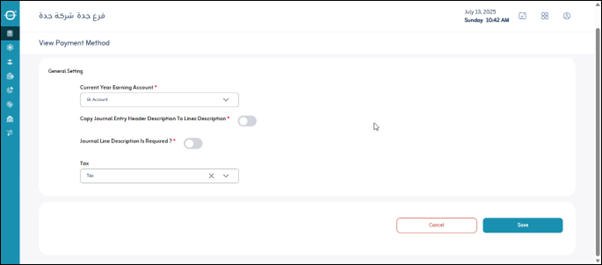
- Current Year Earning Account: Specifies the account to which net profits or losses are transferred at the end of the fiscal year.
- Copy Journal Entry Header Description to Lines description: The user specifies whether the main entry description is automatically copied to each entry line.
- Journal Line Description is required?: Specifies whether a description must be entered for each entry line. (Yes/No)
- Select Tax Account: Specifies the accounting account designated for recording all tax transactions.
Save: After entering the previous fields, the user clicks “Save” to save the general settings.