¶ Cost Center Report
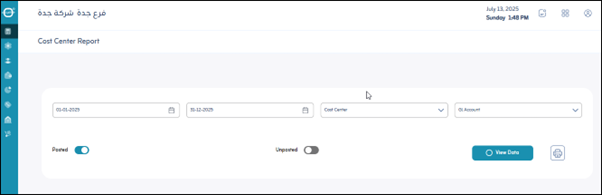
Usage: The Cost Centers Report screen is used to analyze revenues and expenses related to specific cost centers, helping to evaluate the performance of departments or projects.
¶ Options
- Period: Specifies the date range for displaying cost center data (for example, this month or a custom period).
- Cost Center: Select the cost center (or centers) for which you want to view the report.
- Choose Account: Allows you to filter the report to display transactions related to specific accounts within the cost center.
- Posted/Unposted: Include entries that have been permanently posted or those that have not yet been posted in the report.
- View Data: Displays the report on-screen after selecting the options.
- Print: Prints a copy of the displayed cost center report.