¶ Opening Balance Journal Entry
Usage: The “Opening Balances” screen is the primary starting point when introducing a new accounting system or migrating data from an existing system. This screen allows you to enter the beginning balances of all accounts in your chart of accounts, ensuring that the financial statements reflect the company’s true position before you begin recording daily transactions.
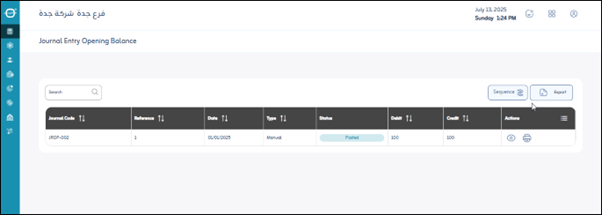
Upon entering the screen, you will find all the opening balances for the accounts previously defined in the system. The user can do the following:
- Click “Export”: To download a PDF or Excel file to the user’s device containing the opening balances for the accounts registered in the system.
¶ Sequence Settings
These settings are used to determine how the opening balances for accounts are automatically set:
- Allowed: Indicates whether the system will allow manual entry numbering or will rely solely on automatic sequencing.
- Sequence Applies to:
- Company: The sequence is company-wide.
- Branch: The sequence is specific to each branch of the company.
- Unit: The sequence may be at the level of a specific organizational unit within the branch.
- Screen: The sequence only applies to entries entered from this screen.
- Sequence Type:
- Annual: The sequence resets to 1 at the beginning of each fiscal year.
- Monthly: The sequence resets to 1 at the beginning of each month.
- Daily: The sequence resets to 1 at the beginning of each day.
- Continuous: The sequence continues to increment without resetting based on a time period.
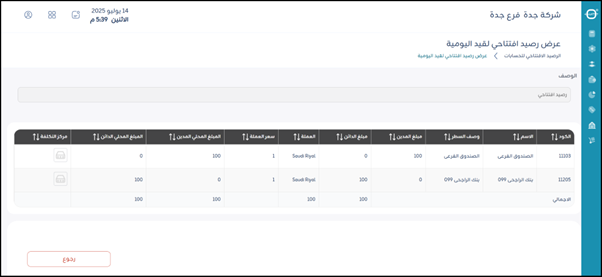
¶ Add an Opening Balance Journal Entry
When the user adds a new opening balance entry, the following fields appear to be entered:
- Code: Enter the accounting account code for which you want to enter the opening balance. This is usually unique for each account in the chart.
- Name: Displays the account name linked to the entered code. It is fetched automatically once the code is selected and helps confirm the correct account (e.g., “Cash Account,” “Bank Account,” “Suppliers Account,” etc.).
- Line Description: A brief description or extra details related to the opening balance for this account in this specific line. Useful for future review (e.g., “Opening balance from 2024 balance sheet” or “Manual opening balance entry”).
- Debit Amount: The debit amount for this account. (Assets/expenses are typically debit-natured; their opening balance appears here.)
- Credit Amount: The credit amount for this account. (Liabilities/equity/revenues are typically credit-natured; their opening balance appears here.)
- Currency: The currency for this opening balance (e.g., “SAR,” “USD,” “EUR”).
- Exchange Rate: The exchange rate of the foreign currency against the local (system base) currency on the opening entry date.
- Local Debit Amount: The debit amount after converting to local currency based on the specified exchange rate (usually auto-calculated as Debit Amount × Exchange Rate).
- Local Credit Amount: The credit amount after converting to local currency based on the specified exchange rate (usually auto-calculated as Credit Amount × Exchange Rate).
- Cost Center: Assign this opening balance to a specific cost center (if your system supports cost center accounting) for more detailed tracking and performance analysis.
Save: After entering the previous fields, the user clicks “Save” to save the opening balance entry.