¶ Asset Locations
¶ Usage
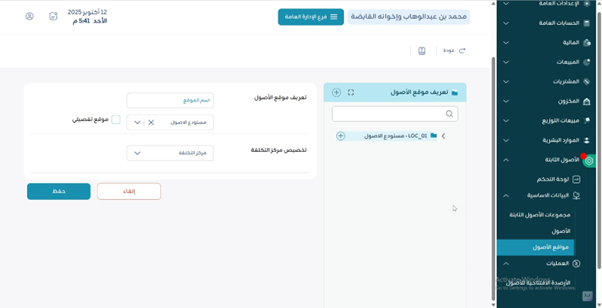
Use this screen to define and manage asset locations (branch/warehouse/room/area) so assets can be
assigned to a precise physical place and inventoried accurately. The page usually includes a searchable list
and a form to add/edit locations.
¶ Fields Description
- Location Code: Unique identifier for the location.
- Location Name: Descriptive name (e.g., HQ – 3rd Floor, Plant A – Tool Room).
- Branch / Warehouse: Optional organizational references.
- Responsible Employee: Person accountable at that location (optional).
- Status: Active / Inactive.
- Description / Notes: Additional details about the location.
¶ Actions
- Add: Create a new location.
- Edit / Delete: Update or remove a location (subject to usage/permissions).
- Search / Filter: Find existing locations by code, name, branch, or warehouse.
- Save: Commit changes after add/edit.
¶ System Behaviors
- Locations marked Inactive cannot be newly assigned to assets but remain in history.
- Changes to a location are logged (user & timestamp) for audit purposes.
- If integrated with multi-branch/warehouse, visibility follows user permissions.
¶ Expected Outcomes
- A clean, searchable catalog of asset locations.
- Assets can be assigned and reported by location.
- Audits and physical counts are simplified with precise location data.