¶ Asset Opening Balances
¶ Usage
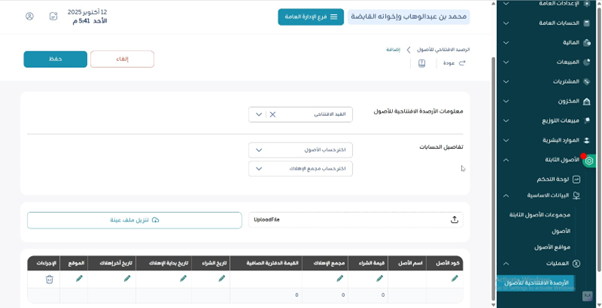
Use this screen to load beginning balances for fixed assets when starting a new fiscal year
or when onboarding into the system. Typically you capture acquisition cost, accumulated depreciation,
and the resulting net book value as of a specific balance date.
¶ Fields Description
- Balance Date: The as-of date for opening balances.
- Asset (Code / Name): The asset that the balance belongs to.
- Acquisition Cost: Historical cost carried over from prior books.
- Accumulated Depreciation: Total depreciation up to the balance date.
- Net Book Value: Auto-derived (Cost − Accumulated Depreciation) if supported.
- Location / Cost Center: Optional references carried forward.
- Reference Document / Notes: Supporting evidence and explanations.
¶ Actions
- Add: Insert a new opening line for an asset.
- Edit / Delete: Adjust or remove a line before saving.
- Save: Commit the opening balances.
- Search / Filter: Find assets to initialize by code, name, or group.
¶ System Behaviors
- Once posted, opening balances may be locked to protect prior periods.
- If depreciation is configured, future runs will continue from the loaded balances.
- Audit trail captures user, timestamp, and changes to opening entries.
¶ Expected Outcomes
- Prior-year positions are reflected as opening balances.
- Reports and depreciation schedules start from the correct base.
- Reconciliation to legacy books is supported via reference and notes.