¶ VAT Report
Usage: The VAT Report screen is a vital tool for businesses to review and generate value-added tax (VAT) reports. This screen helps compile the tax data needed to file periodic tax returns and ensure compliance with applicable tax regulations.
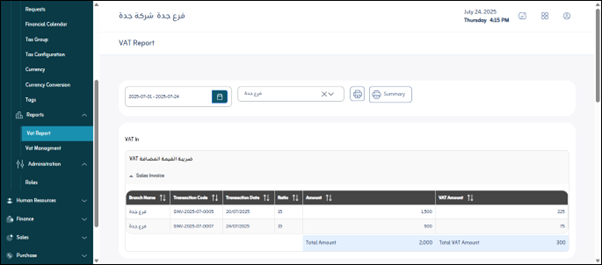
¶ Main Fields in the VAT Report Screen
- Period: This field is used to specify the date range for which you want to generate the VAT report. You can typically choose from predefined periods (e.g., “This Month,” “Last Quarter,” “Current Fiscal Year”) or select a custom date range (from date to date).
- Select Branch: If your company has multiple branches, this field allows you to filter the report to display VAT data for a specific branch. You can select a single branch or “All Branches” if you need a consolidated report.
¶ Available Actions
- Print: This button is used to create a printed copy of the VAT report, or to export it to a printable format such as PDF. This is useful for filing paper reports or for record keeping.
- Summary: This button is used to display a summary of the tax data on the screen. This summary typically shows the main totals for VAT receivables and credits, and the net tax due or refunded for the selected period.