¶ Attribute Definition
¶ Usage
The “Define Item Attributes” screen is used to create and define the properties or attributes that can be assigned to the different items in your system. These attributes help more precisely describe and classify items based on their variable characteristics, such as color, size, or material.
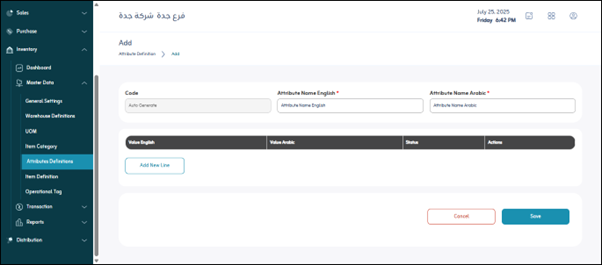
¶ Fields Description
When adding a new attribute, you will specify the following basic information to identify the attribute itself:
-
Code:
The code is generated automatically. -
Attributes name English:*
The full name of the attribute in English. -
Attributes name Arabic:*
The full name of the attribute in Arabic. -
“Add Line” fields:
After defining the basic attribute (such as “Color”), you will need to define the possible values for that attribute. This is typically done by clicking the “Add Line” button to add each possible value:- Value in English: The English name of the value defined within that attribute. (For example, if the attribute is “Color”, the values could be “Red”, “Blue”, “Green”).
- Value in Arabic: The Arabic name of the value defined within that attribute. (For example, “Red”, “Blue”, “Green”).
- Attribute definition status: This status often indicates whether the value is currently active and usable. (For example, “Enabled” / “Disabled”).
- Actions: These icons (usually “Edit” or “Delete”) allow you to manage the value specified for the attribute on that line. (Example: Edit the value name or delete it.)
¶ Actions
Actions: These icons (usually “Edit” or “Delete”) allow you to manage the value specified for the attribute on that line. (Example: Edit the value name or delete it.)