¶ General Settings
¶ Usage
The “Inventory General Settings” screen defines the fundamental parameters that govern how inventory operations behave across the entire system.
These settings ensure consistency in stock movement, valuation, and accounting linkage between different modules.
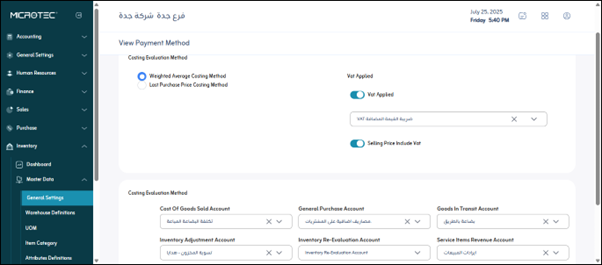
¶ Fields Description
-
Valuation Method:
Determines how the system calculates the cost of items issued or sold. Common methods include:- FIFO (First In, First Out)
- LIFO (Last In, First Out)
- Weighted Average Cost
-
Cost Adjustment Account:
Select the account used to post differences resulting from inventory revaluation or cost adjustments. -
Default Warehouse:
Defines the main warehouse used for storing and issuing goods if no specific warehouse is chosen in transactions. -
Allow Negative Stock:
Enables or disables the ability to issue items even when the available stock balance is zero or below.
(Use with caution — recommended only for service or non-stocked items). -
Default UOM (Unit of Measure):
Sets the default unit of measure to be used in item creation and movement transactions. -
Tax Application Method:
Specifies whether tax is calculated per line item or on the total invoice value. -
Auto-Post to Accounting:
When enabled, all inventory transactions (e.g., receipts, issues, adjustments) automatically generate journal entries in the accounting system.
¶ Actions
- Save:
After entering or modifying the settings, click “Save” to apply the configuration to all inventory operations.