¶ Item Category
¶ Usage
The “Item Category” screen is used to classify items in the inventory system into groups that share similar characteristics or business purposes.
This categorization helps in organizing inventory, simplifying reporting, and applying shared settings like accounts or valuation methods across multiple items.
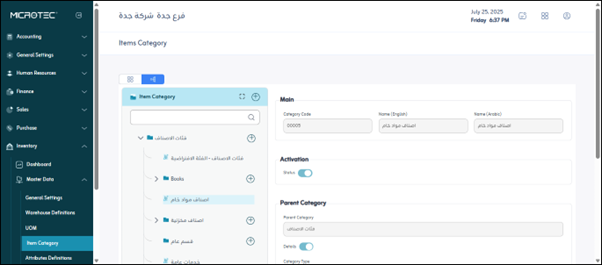
¶ Fields Description
-
Category Code:
A unique identifier for each item category, used for system reference and reporting. -
Category Name:
The descriptive name of the category (e.g., Raw Materials, Spare Parts, Finished Goods). -
Parent Category:
If applicable, assign a higher-level category to build a category hierarchy (e.g., “Materials → Raw Materials → Chemicals”). -
Inventory Account:
The accounting account to which the stock value for items in this category will be posted. -
Cost of Sales Account:
The account that records the cost of goods sold when items from this category are issued or sold. -
Purchase Account:
The account that records purchases related to items in this category. -
Purchase Return Account:
The account that records returned purchases from Vendors. -
Revenue Account:
The account to which income from selling items in this category is posted. -
Discount Account:
The account that tracks sales or purchase discounts applied to items in this category. -
Default UOM:
The default unit of measure used for items within this category. -
Active Status:
Enables or disables the category. Inactive categories cannot be assigned to new items.
¶ Actions
-
Add:
Create a new item category by clicking “Add”, entering all required fields, and saving. -
Edit / Delete:
Update or remove an existing category using the appropriate icons. -
Export:
Download all item category data as Excel or PDF reports. -
Save:
Click “Save” to confirm any changes made.