¶ Item Definition
¶ Usage
The “Item Definition” screen is one of the most essential parts of the Inventory Master Data section.
It is used to define, organize, and manage all items handled by the company — whether they are raw materials, finished goods, spare parts, or services.
Each item must be created and configured correctly for smooth operations across purchasing, sales, production, and accounting.
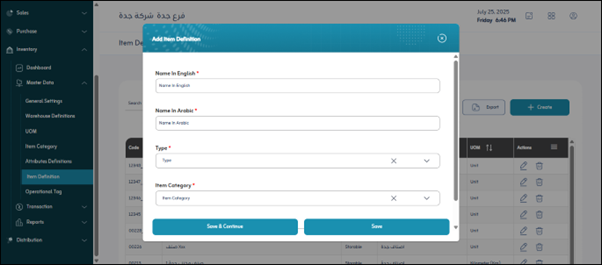
¶ Fields Description
¶ 1. Basic Information
-
Item Code:
A unique identifier automatically generated or manually entered to distinguish each item in the system. -
Item Name:
The official name or description of the item (e.g., “Steel Rod 6mm,” “Printer Cartridge”). -
Item Type:
Specifies whether the item is Stock, Non-stock, or Service. -
Category:
Select the item’s category from the predefined list in the “Item Category” screen. -
Default Warehouse:
The main storage location where the item will be stored or received by default. -
Default Unit of Measure:
The unit used for tracking quantities (e.g., PCS, KG, BOX). -
Active Status:
Activates or deactivates the item from transactions.
¶ 2. Additional Information
-
Barcode:
The item’s barcode for quick search and scanning in transactions. -
Alternate Code:
An optional secondary code (such as manufacturer or supplier reference). -
Item Image:
Attach an image of the item for easy identification. -
Reorder Level:
The minimum quantity at which the system should trigger a reorder alert. -
Lead Time:
The estimated number of days required to restock the item.
¶ 3. Pricing and Cost
-
Standard Cost:
The base cost of the item used for valuation. -
Average Cost:
The dynamically calculated cost based on purchases and inventory movements. -
Sales Price:
The default selling price used in sales transactions. -
Currency:
The currency in which prices and costs are recorded.
¶ 4. Accounting Setup
-
Inventory Account:
The general ledger account for item stock value. -
COGS Account:
The Cost of Goods Sold account for issued or sold items. -
Revenue Account:
The income account used when the item is sold. -
Purchase Account:
The account for recording purchase transactions. -
Purchase Return Account:
The account used when recording returns to suppliers.
¶ 5. Tracking and Control
-
Batch Tracking:
Enable this option if the item is tracked by batch or lot numbers. -
Serial Tracking:
Enable this if the item requires unique serial number tracking. -
Expiry Date:
Activate this option if the item has a shelf life or expiration date.
¶ Actions
-
Add New Item:
Click “Add”, fill in the required fields, and click “Save” to create a new item record. -
Edit / Delete:
Modify or remove an existing item using the appropriate icons. -
Export:
Download all item data as Excel or PDF reports for reference. -
Search:
Use the search bar to find items quickly by name, code, or barcode. -
Save:
After entering or modifying data, click “Save” to store the item definition.