¶ Stock In
¶ Usage
Stock In
Usage: This screen is an essential tool in inventory management used to record the receipt of goods into the warehouse and update inventory records accurately.
This process helps maintain accurate stock records and track the movement of goods within the organization.
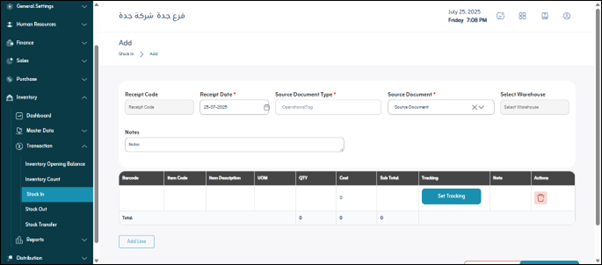
Prerequisites for using the screen:
- The user has the appropriate permissions (admin or inventory user) to add a receipt.
- The warehouse is defined and active.
- Items and their units of measure are predefined.
- If applicable, batch tracking and serial settings are configured.
When you open the screen for the first time, you will find the following sections:
Top-level Filters
These filters help you search for or display a list of previously recorded receipts:
- Search by number: Enter the receipt number to find a specific document.
- Search by date: Allows you to specify a date range to display receipts recorded within that period.
- Status: Allows you to filter receipts based on their status (e.g., “Draft”, “Posted”).
- Source Document Type: Specify the type of document that led to this receipt (e.g., “Purchase Order”, “Sales Return”, “Transfer Receipt”, “Production Receipt”).
- Warehouse: Filter receipts based on the warehouse where the receipt was recorded.
Main buttons in this section:
- Show: Update the list of displayed receipts based on your choices.
- Export: Export the displayed data (the receipts that appeared after filtering) to an external file (Excel/CSV).
Actions (Details - Print):
- Details: View all detailed information related to the receipt (items, quantities, costs, notes).
- Print: Print the selected receipt.
2. Add a new receipt
When you click “Add”, new fields appear to create a new stock receipt:
- Receipt Date *: Mandatory; the date on which the goods were actually received.
- Source Document Type *: Mandatory; the type of document that led to this receipt.
- Source Document *: Mandatory; number/ID of the selected source document.
- Warehouse *: Mandatory; the warehouse into which the goods are received.
- Work Status: Current status (e.g., “Draft”, “Under Review”, “Posted”).
- Notes: Free text field for remarks.
Item Lines:
- Barcode / Item Code / Description / Unit of Measure – standard item identification fields.
- Quantity / Cost / Subtotal (Qty × Cost) – quantity and value details.
- Tracking: serial/batch/expiry if required.
- Notes: line notes.
- Actions (Delete): remove the line if added by mistake.