¶ Stock Out
¶ Usage
Stock Out
Usage: This screen is a vital part of inventory management, used to record the dispatch of goods out of the warehouse and update inventory records accurately.
This process helps maintain accurate stock records and track the movement of goods out of the organization.
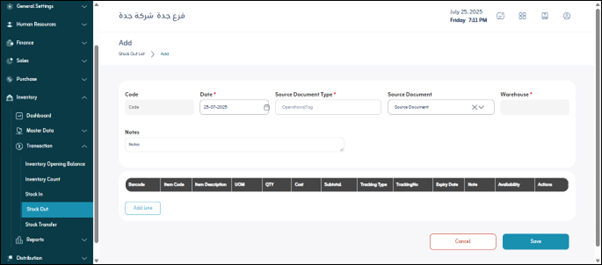
Prerequisites for using the screen:
- The user has appropriate permissions to record a stock out.
- The warehouse is defined and active.
- Items and their units of measure are predefined.
- If applicable, batch tracking and serial settings are configured.
When you open the screen, you will find:
Top-level Filters
- Search by number / Search by date / Status / Source Document Type / Warehouse.
Main Buttons
- Show / Export.
Actions (Details – Print)
- Details / Print.
2. Add a New Dispatch
- Dispatch Date * / Source Document Type * / Source Document * / Warehouse * / Work Status / Notes.
Item Lines
- Barcode / Item Code / Description / Unit of Measure / Quantity / Cost / Subtotal (Qty × Cost) / Tracking / Notes / Actions (Delete).