¶ Vendor Category
¶ Usage
The Vendor Categories screen is a key component of the Purchase management system, allowing Vendors to be classified based on their common characteristics.
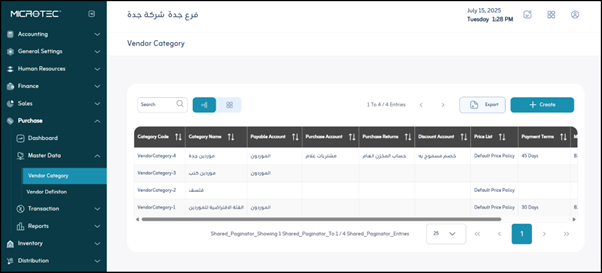
Upon entering the screen, you will find all Vendor categories previously defined in the system. The user can do the following:
-
Click “Export”
To download a PDF or Excel file to the user’s device containing data for the Vendor categories registered in the system. -
View the data for a specific category by clicking on the “eye” icon for the category.
-
Edit the data for a Vendor category defined in the system by clicking on the “pen” icon.
-
Delete a Vendor category defined in the system by clicking on the “Trash Can” icon.
Note: The user can search for a Vendor category defined in the system using the search bar at the top to facilitate and speed up the process.
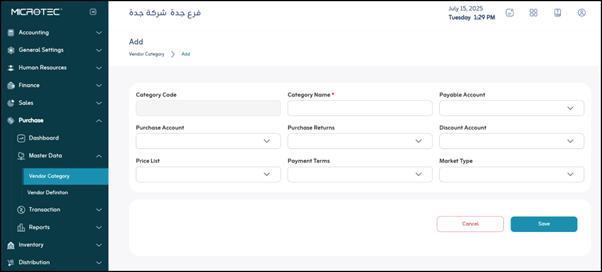
Add a new Vendor category by clicking on the “Add” button.
The Vendor category data addition screen will appear, containing the following fields:
- Category Code: A unique number or code for each category, used as the primary identifier for the category in the system.
- Category Name: The user enters a name and description of the type of Vendors in this category.
- Payable Account: The user selects the accounting account in which to record amounts owed to Vendors.
- Purchase Account: The user selects the accounting account in which to record the value of purchases.
- Purchase Returns: The user selects the accounting account for purchase returns. This account is used to record amounts returned to Vendors.
- Discount Account: The accounting account for purchase discounts is selected to be the effective account when recording cash discounts on invoices.
- Price List: The reference list of prices applied to this category, to determine specific prices for a group of Vendors.
- Payment Terms: Specify the agreed-upon terms for the payment method and date, for example: “Cash”, “30-day credit.”
- Market Type: A classification of the nature of the market in which the Vendor operates.
Options:- B2B (Business to Business): Business-to-Business relationships
- B2C (Business to Consumer): Direct sales to consumers
- Save: After entering the previous fields, the user clicks “Save” to save the Vendor category data.