¶ Vendor Definitions
¶ Usage
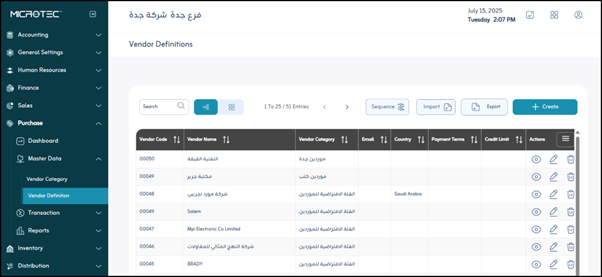
The Vendor Definitions screen is one of the primary screens within the Master Data section of the Microtec Purchase System.
Upon entering the screen, you will find all the information about the Vendors previously defined in the system. The user can do the following:
- Click “Export” to download a PDF or Excel file to the user’s device containing the information about the Vendor categories registered in the system.
- View the information about a specific Vendor by clicking on the Vendor’s “eye” icon.
- Edit the information about a Vendor defined in the system by clicking on the “pen” icon.
- Delete a Vendor defined in the system by clicking on the “Trash Can” icon.
Note: The user can search for a Vendor defined in the system using the search bar at the top to facilitate and speed up the process.
Add a new Vendor to the system by clicking on the “Add” button.
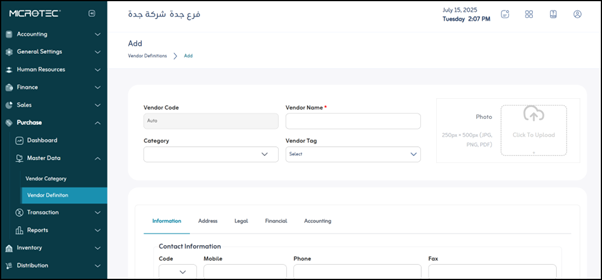
The Vendor data addition screen will appear, containing the following fields:
-
Basic Vendor Information:
- Vendor Code: A unique Vendor identification code automatically generated by the system when a new Vendor is added. This ensures that there are no duplicate codes and makes it easier to search for and work with Vendors in other systems.
- Vendor Name*: The official name of the Vendor (company or individual). The asterisk (*) indicates that this is a mandatory field that must be entered to complete the Vendor data saving process.
- Category: To identify the category to which the Vendor belongs (for example, raw material Vendor, service Vendor, electronics Vendor). These categories are predefined in the “Vendor Categories” screen and help organize and categorize Vendors for reporting and analysis purposes.
- Vendor Tag: Can be used to add a special tag or category to the Vendor (for example, primary Vendor, secondary Vendor, new Vendor). This can aid in sorting and filtering.
- Vendor Image: To attach an image of the Vendor (such as the company logo), which aids in visual identification and customization of the Vendor file.
-
Contact Information:
This group allows you to record the various ways to communicate with the Vendor.- Code: This may be an additional internal code for the Vendor or part of an international telephone number (country code).
- Mobile: The Vendor’s primary mobile telephone number.
- Phone: The Vendor’s landline telephone number.
- Fax: The Vendor’s fax machine number.
- Email: The Vendor’s official email address, used for correspondence, sending purchase orders, and notifications.
- Website: The Vendor’s official website address.
-
Contact Person Information:
These sections are used to record the contact details of the direct contact within the Vendor’s company.- Contact Name: The name of the primary contact within the Vendor’s company.
- Code: This may be the contact person’s internal identification code or part of their telephone number.
- Mobile: The contact person’s mobile telephone number.
- Phone: The contact person’s landline telephone number.
- Email: The contact person’s email address.
-
Address Information:
This is used to accurately identify the Vendor’s geographical location.- Country: The country in which the Vendor is located.
- Region: The region or province within the country.
- City: The city in which the Vendor is located.
- Street: The street name and building number.
- Longitude: The geographic longitude coordinate of the Vendor’s location, useful for mapping or positioning applications.
- Latitude: The geographic latitude coordinate of the Vendor’s location.
- Error Radius: This may be used to specify the margin of error in geolocation (usually in kilometers or meters) if the location is not completely accurate.
-
Legal and Business Information:
This information is necessary for legal and tax transactions.- Commercial ID: The Vendor’s commercial register number, a legal identification number for businesses.
- Tax ID: The Vendor’s tax identification number, necessary for invoicing and tax purposes.
-
Financial Terms of Transaction:
These fields define the financial aspects of the transaction with the Vendor.- Payment Terms: Define the payment terms agreed upon with the Vendor (e.g., immediate payment, 30 days net, 60 days end of month), and affect invoice due dates.
- Price List: This may be used to link the Vendor to a specific price list for the products they sell, if special pricing has been agreed upon.
- Credit Limit: The maximum amount of credit allowed to a Vendor before payments are due, helping to manage financial risk.
- Currency: The default currency in which financial transactions with this Vendor are conducted (e.g., Saudi Riyals, US Dollars, Egyptian Pounds).
-
Accounting Accounts:
These fields are critical for linking the Vendor to the general ledger system to ensure the correct posting of financial transactions.- Payable Account: The accounting account that represents the liabilities owed to Vendors.
- Purchases Account: The accounting account to which the cost of purchases is charged.
- Purchase Returns: The account used to record the value of goods returned to Vendors, reducing the net purchase cost.
- Discount Account: The account in which any discounts granted by the organization when purchasing from this Vendor (earned discount) are recorded.
Save: After entering the previous fields, the user clicks “Save” to save the Vendor category data.