¶ Vendor Balance Report
¶ Usage
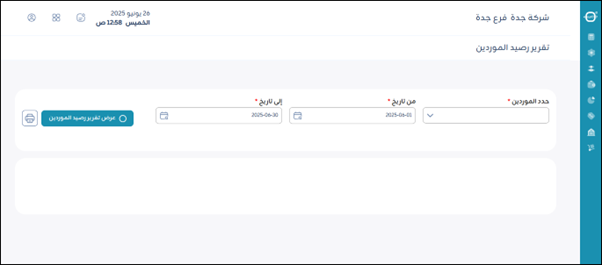
The Supplier Balance Report screen displays a summary of balances owed to or from suppliers over a specific period.
¶ Main Fields
-
Select Suppliers:
This field is mandatory. It allows you to select the suppliers you want to include in the report. -
From Date:
This field is mandatory. It is used to specify the start date of the period for which you want to analyze supplier balances. -
To Date:
This field is mandatory. It is used to specify the end date of the period for which you want to analyze supplier balances. -
“View Supplier Balance Report” Button:
After selecting the suppliers and period dates, click this button to generate and view the report on screen. -
Print:
This button is used to print the currently displayed supplier balance report. Clicking this will create a printable version of the report.
¶ Report Details
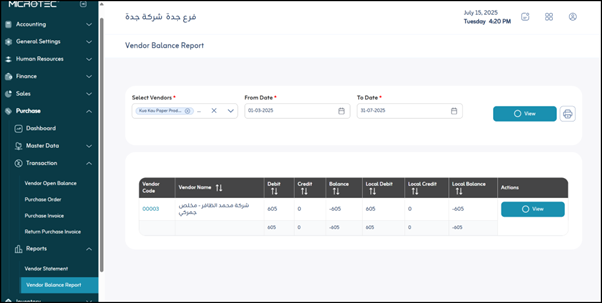
This section contains a table summarizing supplier balances for the selected period, including the following fields:
- Supplier Code: The unique identification number for each supplier in your system.
- Supplier Name: Displays the full name of the supplier.
- Debit: Represents the total amounts receivable (owed to you from the supplier or paid to you) during the selected period, in the original currency of the transactions.
- Credit: Represents the total amounts credited (owed to the supplier from you) during the selected period, in the original currency of the transactions.
- Balance: Displays the closing balance of the supplier in the original currency of the transactions at the end of the selected period.
- Local Debit Balance: Represents the total amounts receivable to the supplier (owed to you or paid to them) during the period, but converted to your system’s base local currency.
- Local Credit Balance: Represents the total amount credited to the supplier (due to you) during the period, but after converting it to your system’s base local currency.
- Local Balance: Displays the supplier’s ending balance at the end of the selected period, but after converting it to your system’s base local currency.
- View Supplier Balance Report: By clicking this button, the user can navigate to the Supplier Statement.