¶ Vendor Statement Report
¶ Usage
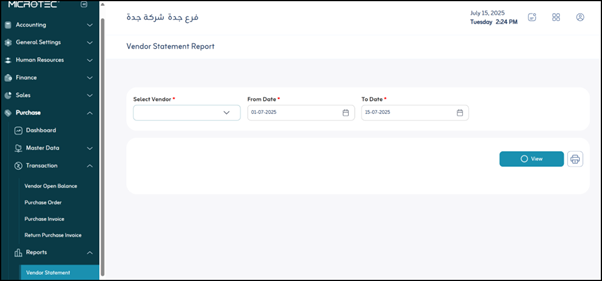
The “Supplier Statement” screen is used to view and track all financial transactions related to a specific supplier over a specific period of time.
¶ Main Fields
-
Select Supplier:
This field is mandatory and is used to select the supplier whose statement you want to view. -
From Date:
This field is mandatory and is used to specify the start date of the period for which you want to view the statement. -
To Date:
This field is mandatory and is used to specify the end date of the period for which you want to view the statement. -
View:
After selecting the supplier and the start and end dates, click this button to view the statement on the screen. -
Print:
This button is used to print the displayed supplier’s statement. When clicked, a printable version of the current statement will be generated.
¶ Statement Details
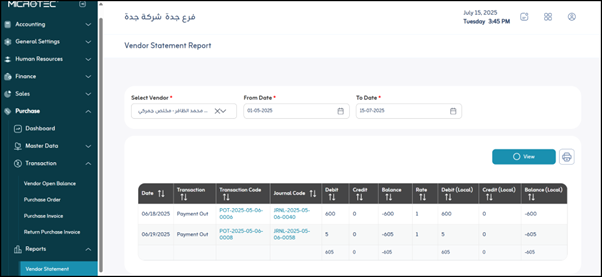
This section contains details for all the supplier’s financial transactions during the specified period. It includes the following fields:
- Date: Displays the date the transaction occurred.
- Transaction Name: Describes the type of transaction, such as “Purchase Invoice,” “Payment Payment,” “Debit Note,” “Addition Note,” and so on.
- Transaction Code: The unique identification number for each transaction, which helps track and easily reference it in system records.
- Debit: Represents the amounts added to the supplier’s balance (i.e., the amounts you owe the supplier).
- Credit: Represents the amounts deducted from the supplier’s balance (i.e., the amounts you paid the supplier or the discounts you received).
- Balance: Displays the cumulative balance for the supplier after each transaction. This balance is updated after each transaction (debit or credit) and reflects the total amount owed to the supplier or you up to the transaction date.
- Rate: This field appears if transactions were made in a currency other than the system’s base local currency.
- Local Debit: Represents the amounts debited (due to the supplier) after converting them to the system’s local currency (Saudi Riyals).
- Local Credit: Represents the amounts credited (paid or debited by you to the supplier) after converting them to the system’s local currency (Saudi Riyals).
- Balance (Local): Displays the supplier’s cumulative balance after each transaction, but in the system’s local currency.