¶ Vendor Opening Balance
¶ Usage
This screen is intended for entering or modifying an accounting entry representing the opening balance of a Vendor at the beginning of a new accounting period or when starting to use the system.
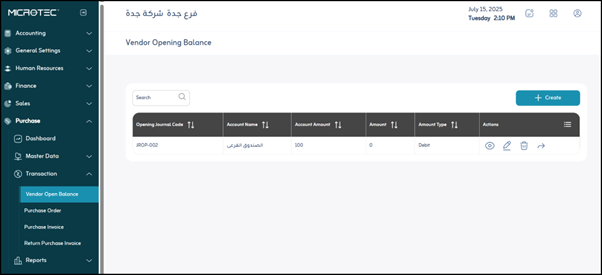
Upon logging in, you will find the opening balances for the Vendors previously defined in the system:
- Opening Journal Code: The opening journal (entry) number or code.
- Account Name: The name of the account to which the opening balance relates. In the example, “Subfund.”
- Account Value: The financial value of the account. In the example, “100.”
- Amount: This appears to represent the same as the “Account Value” or transaction amount.
- Amount Type: Specifies whether the amount is a “Debit” or “Credit” amount.
The user can:
- View the opening balance for a specific Vendor by clicking on the “Eye” icon.
- Edit the opening balance for Vendors defined in the system by clicking on the “Pen” icon.
- Delete a Vendor’s opening balance in the system by clicking on the “Trash Can” icon.
- Add the opening balance of Vendors to the system by clicking the “Add” button.
The Vendor data addition screen will appear, containing the following fields:

- Opening Journal: Select the correct journal in which this entry will be recorded (for example, the opening balances journal).
- Journal line: Select the corresponding accounting account for this balance. If the Vendor’s balance is due, the corresponding account is often a bank or cash account (if the balance results from advance payments, for example), or a specific expense account.
- Amount: Enter the total amount of the Vendor’s opening balance.
- (Debit/Credit): Specify whether the balance is debit (the Vendor owes the company) or credit (the company owes the Vendor).
- Add line: The user clicks the “Add Item” button to add a new Vendor to the opening balance list.
- Code: The unique code or identifier for the Vendor in the system.
- Name: The name of the Vendor or Vendor company.
- Balance: The current balance value for the Vendor at the beginning of the financial period.
- Balance Type: Specify whether the balance is debit or credit.
- Due Date Distribution: The ability to allocate the balance across different due dates if the balance is large or divided.
- Actions: A set of available commands, such as Delete.
- Total: The sum of all balances entered for Vendors in this journal.
- Save: After entering the previous fields, the user clicks “Save” to save the opening balance for Vendors.