¶ Customer Definition
¶ Usage
The Customer Profile screen is the central hub for managing customer data.
It allows you to record each customer’s details — from basic contact information to financial, legal, and geographic data.
This ensures a comprehensive and centralized customer database that supports sales, accounting, and communication processes.
¶ Prerequisites
Before adding a new customer, ensure the following:
- You have the necessary permissions to access this screen.
- The sequence for this screen has been created to enable adding new customers.
- All required customer and financial details are available.
- Customer classifications and related accounting settings are predefined.
¶ Display Fields
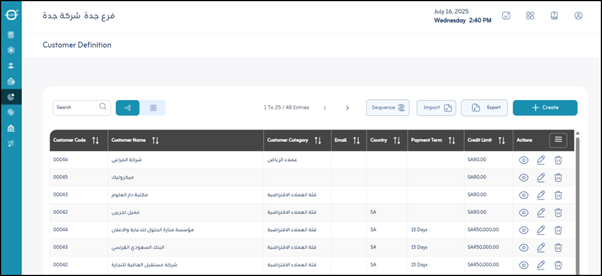
When you open the “Customer Profile” screen, you’ll find a list of registered customers along with management options:
-
Add Customers (via file upload):
Allows importing multiple customer records at once using an Excel or CSV file — ideal for bulk registration. -
Export:
Exports the displayed or complete customer list to external files (Excel or PDF) for reporting or analysis. -
Sequence:
Indicates the internal sequence number assigned to each customer or the display order in the list. -
Actions:
Enables management of individual customer records:- Details: Displays full customer details on a dedicated screen.
- Edit: Opens an editable form for updating customer data.
- Delete: Removes a customer record from the system (use with caution).
¶ Fields after Clicking “Add New Customer”
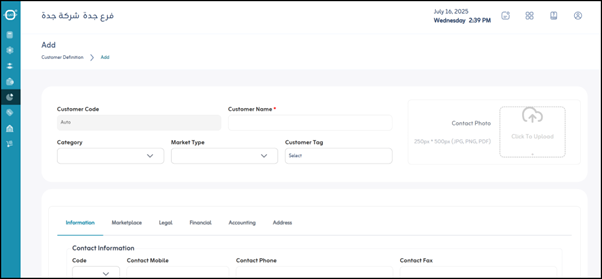
When you click “Add”, a form will appear to input customer details.
Fields are organized into sections for easier data entry:
¶ Basic Information
- Customer Code:
A unique code assigned to each customer (auto-generated or manual). - *Customer Name :
The customer’s full name or company name. (Mandatory) - Category:
The customer classification (e.g., Retail, Wholesale, Preferred Customer, Partner). - Customer Type:
Indicates whether the customer is an Individual or a Business. - Customer Tag:
Keywords or tags to describe and categorize the customer (e.g., VIP, Prospective, Payment Issues). - Contact Image:
Option to upload a customer photo or company logo.
¶ Contact Information
- Symbol:
International dialing code, area code, or internal contact code. - Mobile:
Customer’s mobile number or primary contact number. - Phone:
Landline number (if applicable). - Fax:
Fax number (if applicable). - Email:
Main email address of the customer. - Website:
Customer or company website address.
¶ Contact Person Information
- Contact Person Name:
Name of the main point of contact in the customer’s organization. - Country Code:
Country calling code for the contact person’s phone. - Contact Person Phone:
Phone number of the responsible contact person.
¶ Market
- Market:
Identifies the market type (e.g., Local Market, Gulf Market, European Market). - Sales Representative:
Salesperson assigned to this customer for tracking and commissions. - Address:
General or primary business address.
¶ Legal Information
Used for recording official and legal details — especially for company customers.
- Country:
The country where the customer is located. - City:
The customer’s city. - Area:
District or neighborhood. - Street:
Main street name. - Additional Street Name:
Extra address details (building name/number, floor, etc.). - Building Number:
Building or property number. - Registered Name:
Official name of the company as listed in commercial records. - Commercial Registration Number:
Official registration number of the company. - Tax Number:
Company’s tax identification number. - Postal Zone:
Postal or ZIP code. - Other ID Number:
Any additional identification number. - National ID Number:
National ID number if the customer is an individual.
¶ Financial Information
- Payment Term:
Agreed payment terms (e.g., Immediate Payment, Net 30, Net 60). - Price List:
Default price list applied to the customer (e.g., Wholesale Price List). - Allow Credit Limit:
Indicates if the customer can make purchases on credit (Yes/No). - Currency:
The transaction and billing currency used for this customer.
¶ Accounting
Defines how the customer is linked to your accounting structure:
- Account Receivable:
GL account for amounts owed by this customer. - Sales Account:
Revenue account for sales to this customer. - Sales Return Account:
Account for recording sales returns. - Discount Account:
Account used to record customer discounts.
¶ Address (Geographic)
- Latitude:
Geographic latitude coordinate of the customer’s location. - Longitude:
Geographic longitude coordinate of the customer’s location. - Range (meters):
Defines a radius for delivery or service coverage area. - Location on Map:
Opens a map or thumbnail view to visually locate the customer; automatically fills in latitude/longitude.
¶ Actions
- Save:
After entering the customer data, click “Save” to save it in the system.