¶ Sales Team
¶ Usage
This screen is intended to define and manage different teams within the sales department.
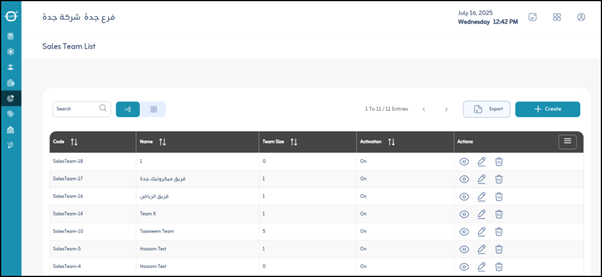
¶ Team Data Display Fields
When viewing a list of sales teams, you’ll typically find these columns for each team:
-
Code:
A unique, short identifier for each sales team. It can be a number or an alphabetical code (e.g., “F01”, “TEAM_A”). -
Team Name:
The full, descriptive name of the team (e.g., “North Regional Sales Team”, “Large Enterprise Sales Team”). -
Team Size:
Indicates the number of salespeople on this team. This number may be automatically updated based on the assignment of employees to teams. -
Activity (On - Off):
A team status indicator, showing whether the team is active (On) and able to make sales, or inactive (Off) and temporarily or permanently suspended. -
Actions (Details - Edit - Delete):
Buttons or links that appear next to each team and allow specific actions:- Details: View more detailed information about the team, such as its members or objectives.
- Edit: Change team information (name, status, add/remove members).
- Delete: Remove the team from the system. This usually requires confirmation and should be used with caution, especially if the team has associated sales records.
-
Export (Excel - PDF):
Options to export the sales team list to different formats:- Excel: Export data to a spreadsheet for analysis or reporting.
- PDF: Export data to a PDF document for printing or static sharing.
¶ Add Option
- Add (Team Name):
This option allows you to create a new sales team. When clicked, the system prompts you to enter a team name and possibly its initial code. Additional details can be added later.
¶ Actions
- Save:
After entering the previous fields, the user clicks “Save” to save the sales team in the system.