¶ Salesman
¶ Usage
The screen serves as the primary interface for managing and tracking your sales representative information.
It allows you to view existing sales reps, add new ones, edit their details, delete them when necessary, and export data for analysis or record keeping.
¶ Display Fields
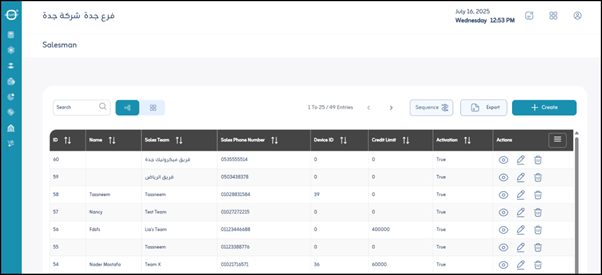
When you open the “Sales Personnel” screen, you’ll see a list of all current sales representatives. Each representative includes the following information:
-
ID:
A unique identifier assigned to each sales representative, used for identification within the system. -
Name:
The name of the sales representative. -
Sales Team:
The name of the team the sales representative belongs to (e.g., Cairo Team, Outside Sales Team). -
Sales Phone Number:
The phone number assigned to the sales representative for communication purposes. -
Device ID:
If the representative uses a company device (tablet, smartphone) for recording sales or tracking activities, its device ID appears here. -
Credit Limit:
Indicates the maximum credit amount the representative can grant to customers, or a limit related to their financial authority. -
Activation:
Indicates whether the sales representative’s account is active in the system. -
Actions:
Allows direct actions on a representative’s record:- Edit: Modify the representative’s current data.
- Details: View more detailed information about the representative.
- Delete: Remove the representative from the system (requires caution).
-
Export File (PDF - Excel):
Options for exporting data displayed on the screen:- PDF: Exports data as a non-editable document, suitable for printing or static reports.
- Excel: Exports data to a spreadsheet for analysis or external reporting.
¶ Add New Sales Representative
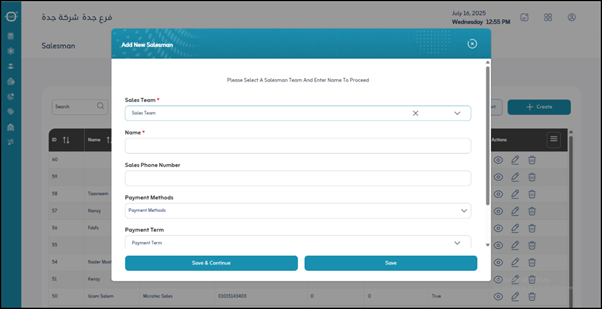
When adding a new sales representative, click “Create”. Input fields will appear for entering the representative’s data.
-
*Sales Team :
Specify the team to which the new representative will belong. (Mandatory field) -
*Name :
Enter the name of the sales representative. (Mandatory field) -
Sales Phone Number:
Enter the representative’s phone number. -
Payment Methods:
Define the payment methods accepted by the representative. -
Payment Terms:
Specify the payment terms applied to customer payments handled by this representative. -
Treasury:
Define the treasury or cash account used by the representative for depositing collected cash.
¶ Actions
- Save:
After entering the representative’s information, click “Save” to store the record in the system.