¶ Customer Balance Report
¶ Usage
The Customer Balance Report screen displays the final balance for each customer (or a specific customer) on a specific date — typically the report date or the last data update date.
It provides a quick snapshot of the amounts owed to you by customers or the advance payments made by them.
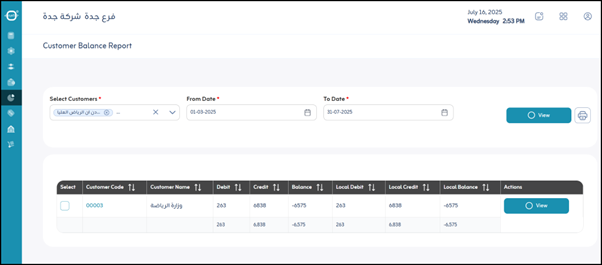
¶ Fields and Functions
- Period: Specifies the date range for displaying customer balances (e.g., Today, This Month, or Custom Period).
- Select Customer: Selects the customer whose balance you want to view.
- View: Displays the balance on the screen after selecting the options.
- Print: Prints a copy of the displayed customer balance.
¶ Report Data
After clicking “View”, the report displays the following information about customer balances:
- Customer Code: The unique identification number for each customer.
- Customer Name: The full name of the customer.
- Debit: The total amount of debits accrued by the customer during the specified period (from date to date).
These represent sales or other additions to the customer’s balance owed to you during that period. - Credit: The total amount of credits (payments or discounts) made by the customer during the specified period.
- Balance: The customer’s final balance as of the end of the To Date period, taking into account all transactions before and during the period.
- Positive Balance: Indicates that the customer owes you this amount on the To Date.
- Negative Balance: Indicates that the customer has a credit balance (overpayment or advance payment) as of the To Date.
- Local Debit: The total debited amount in local currency during the period.
- Local Credit: The total credited amount in local currency during the period.
- Local Balance: The final customer balance in local currency as of the To Date.
- Actions (View): Clicking this button redirects the user to the detailed Customer Statement Report for that specific customer.