¶ Customer Statement Report
¶ Usage
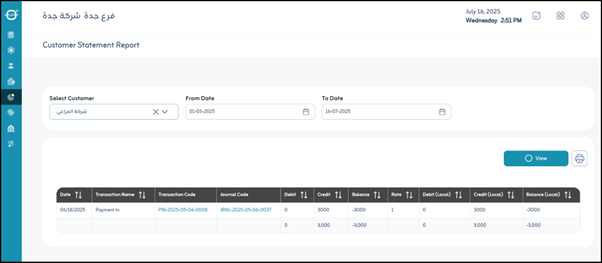
The Customer Statement Report screen provides a comprehensive view of all financial transactions made with a specific client over a defined period.
It helps users understand the client’s financial position, track payments, receivables, and analyze all transactions that have affected their balance.
¶ Fields and Functions
- Period: Specifies the date range for displaying the customer statement (e.g., Today, This Month, or Custom Period).
- Select Customer: Selects the customer whose statement you wish to view.
- View: Displays the customer statement on the screen based on the selected filters.
- Print: Prints a copy of the displayed customer statement.
¶ Report Data
After clicking “View”, the system displays a detailed table summarizing the customer’s account movements.
Below are the columns and their meanings:
- Date: The date each transaction occurred.
- Transaction Name / Code: Describes the transaction type, such as Sales Invoice, Receipt Voucher, Disbursement Voucher, Goods Return, or Balance Adjustment.
A short transaction code may also appear for easier identification. - Journal Code: Refers to the daily journal entry associated with the transaction. Each transaction is recorded with a unique journal code.
- Debit: The amount owed by the customer (e.g., when goods are sold but not yet paid). This increases the customer’s receivable balance.
- Credit: The amount paid by the customer or deducted from their receivables (e.g., payment received). This decreases the customer’s balance.
- Balance: The cumulative balance after each transaction.
It starts from the opening balance and changes with every debit or credit entry.
A positive balance means the customer owes the company, while a negative balance (depending on the display format) may indicate an advance or credit balance. - Prices: Displays the conversion rate when foreign currency is used. For local currency, the value is 1.
- Local Debit: Same as Debit, but shows the value in the local currency (useful for multi-currency systems).
- Local Credit: Same as Credit, but shown in the local currency.
- Local Balance: Same as Balance, but shown in the local currency — providing a clear financial overview in the company’s base currency.