¶ Customers Opening Balance
¶ Usage
The Customer Opening Balance screen is used to record customer opening balances in the accounting system.
These balances represent the amounts owed by customers to your company (debit), or amounts your company has paid in advance to customers (credit) at the start of an accounting period.
They are usually recorded as entries in the Opening Journal.
¶ Prerequisites
Before using this screen, ensure the following:
- You have the necessary permissions to access the Customer Opening Balance screen.
- Customers are linked to the Accounts Receivable account (either through the Customer Definition or Customer Category screens).
- An Opening Journal Entry has been configured in the system beforehand.
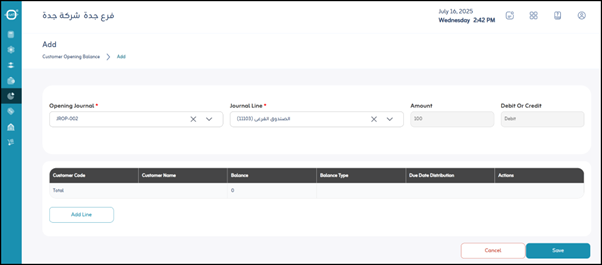
¶ Fields in the Screen
-
*Opening Journal :
Mandatory field to specify the accounting journal in which the opening entry will be recorded. Typically, a dedicated journal is created for opening balances. -
*Journal Line :
Indicates the details of the accounting entry itself. Each journal entry consists of a debit and a credit side. -
Amount:
The total amount of the journal entry being recorded. -
Debit or Credit:
Defines the nature of the amount:- Debit: The amount owed by the customer (an asset for the company).
- Credit: The amount owed to the customer (a liability for the company).
¶ Fields when Clicking “Add Line” (Customer Balance Details)
Within the general opening entry, each customer’s balance must be recorded individually.
When you click “Add Line”, the following fields appear:
-
Customer Code:
The unique identifier of the customer whose opening balance is being recorded. -
Customer Name:
The customer’s name linked to the balance (may auto-fill after entering the Customer Code). -
Balance:
The specific amount of the opening balance for this customer. -
Balance Type:
Specifies whether the balance is Debit (owed by the customer) or Credit (owed to the customer).
This differs from the “Debit/Credit” field at the journal level, as it applies individually per customer. -
Due Date:
The date when the customer is expected to pay (if debit) or when the company must refund (if credit). -
Actions:
- Edit: Modify the details of this balance line.
- Delete: Remove this customer’s opening balance line.
¶ Actions
- Save:
After entering all fields, click “Save” to record the customer opening balances in the system.