¶ Sales Return Invoice
¶ Usage
The Sales Return Invoice screen is a crucial tool for managing customer returns.
It allows users to record returned items, adjust inventory balances, and document the financial impact of returns in the accounting system.
¶ Prerequisites
- The user must have the necessary permissions to access the Sales Return Invoice screen.
- A sequence must be created for this screen to enable adding new sales return invoices.
- Previously recorded Sales Invoices must exist in the system.
- The user should understand the returns concept and related accounting procedures.
¶ Adding a New Sales Return Invoice
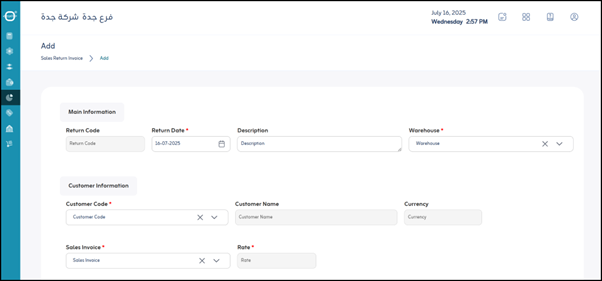
When you click “Add”, a new screen or form will open to enter the details of a sales return.
Fields are organized into clear sections for easy data entry.
¶ Main Information
- Return Code:
A unique identifier for the return invoice. It can be auto-generated by the system or manually entered. - *Return Date :
The date when the items were returned or when the return invoice was created. (Mandatory) - Description:
Optional field to describe the reason for the return (e.g., Damaged Item, Wrong Order). - *Warehouse :
The warehouse where the returned items will be received. (Mandatory)
¶ Customer Information
- *Customer Code :
The customer’s identification code. (Mandatory) - Customer Name:
Automatically filled after selecting the customer code. - Currency:
The currency used in the original sale and the return calculation. - *Sales Invoice :
The number of the original sales invoice from which the items are being returned. (Mandatory) - *Price :
The unit price of the item from the original invoice. Automatically re